
Download Aweh TV APK – Latest Version for Android TV & Firestick
compatible with android smartphones, smart tv, tv box, tv stick

Mobile Version
Download
Android TV
Download
TV Box
Download
TV Stick
DownloadHow to install the app on your TV device?
STEP 1
Access the Play Store and download the app “Downloader by AFTVnews”

STEP 2
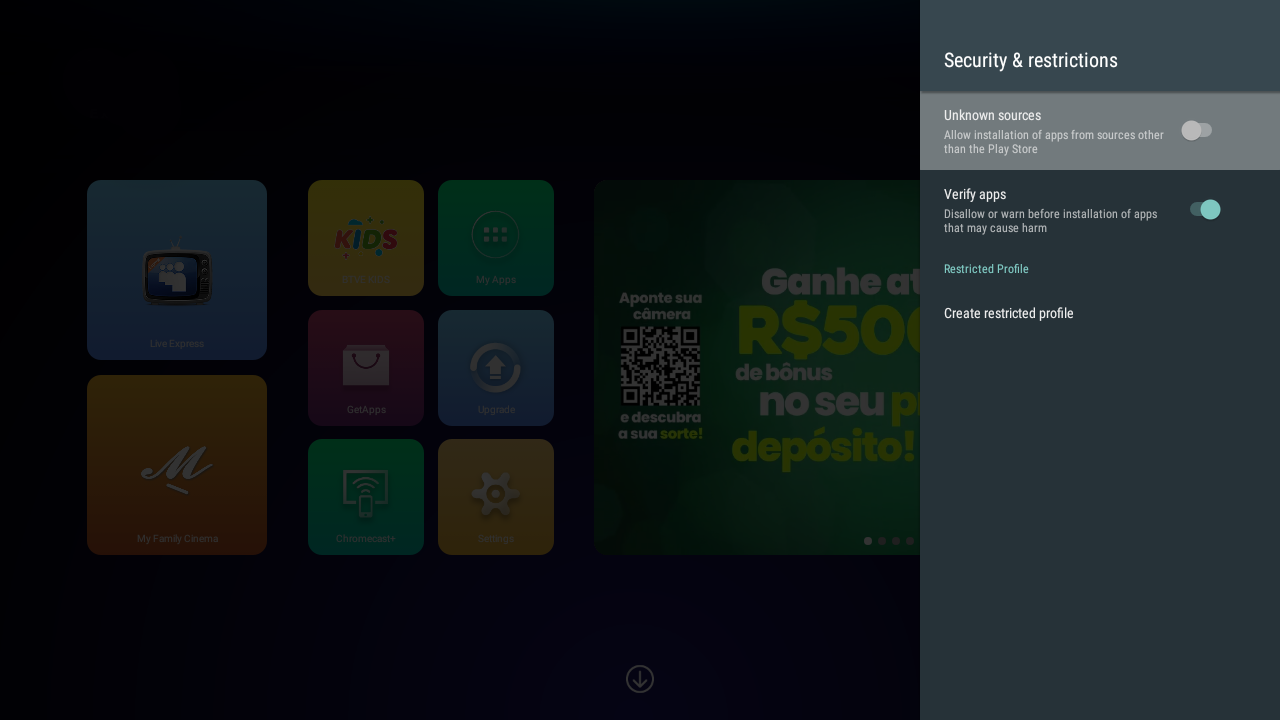
Go to settings > security & restrictions > enable apps from unknown sources.
STEP 3
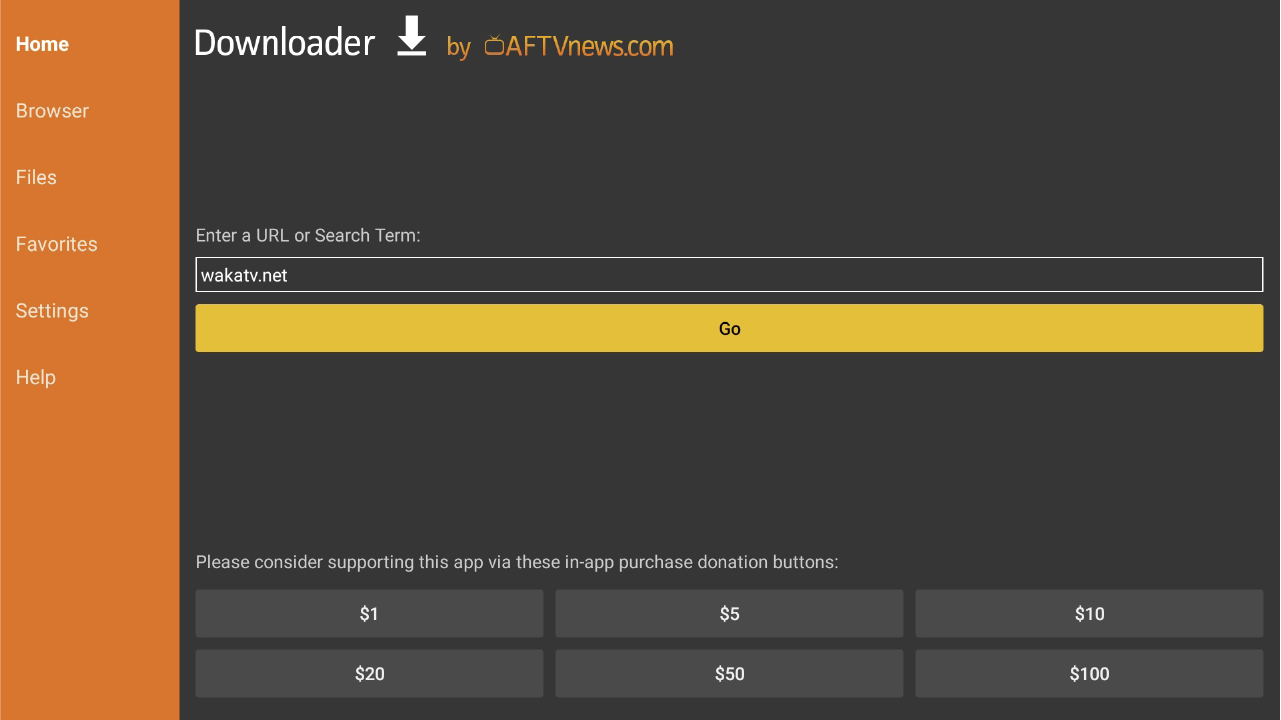
Open “Downloader by AFTVnews” and type 6550144 to install the App
Aweh TV app download for Android TV, TV Box, TV Stick and mobile
Download the official AwehTV app for compatible Android devices. The app works best on Android TV boxes, Android TV devices, TV sticks, Firestick-style devices, Smart TVs with Android support, and supported Android phones.
Install AwehTV with Downloader code 6550144
- Install Downloader by AFTVnews from your device app store.
- Allow installation from unknown sources for Downloader.
- Open Downloader and enter 6550144 to install the AwehTV app.
Device notes
- Android TV and TV Box: use Downloader code 6550144 or download the APK directly from this page.
- TV Stick and Firestick-style devices: install Downloader first, then enter 6550144.
- Android phones: download the mobile APK and allow installation from your browser if prompted.
- Smart TVs: AwehTV works best on Android-based Smart TVs. Samsung Tizen and LG webOS devices may need an Android TV box or TV stick.
After installing AwehTV
Open the app, find your Device ID, then choose a package on the AwehTV packages page. If you need help, use the Device ID guide.
Start with AwehTV
Install the app, choose a package, and renew using the Device ID shown inside your AwehTV app.
Download the AwehTV app before choosing a package
This page is the official AwehTV app download route for Android TV, TV Box, TV Stick and compatible Android devices. After installing the app, choose an AwehTV package and use the Device ID shown inside the app.
Can I install the AwehTV APK on Samsung or LG Smart TV?
Most Samsung Smart TVs use Tizen and most LG Smart TVs use webOS, so a normal Android APK usually cannot be installed directly on those TVs. AwehTV works best on Android TV, Google TV, Android TV Box, TV Stick, Firestick-style devices, and Android mobile devices. If your Smart TV is not Android-based, use a compatible Android TV Box or TV Stick.
After installing the app, compare AwehTV packages and prices.
Install AwehTV with Downloader code 6550144
On Android TV, Google TV, TV Box, TV Stick, or Firestick-style devices, open Downloader by AFTVnews and enter 6550144 to reach the AwehTV APK install page. After installing the app, use AwehTV packages and prices to choose a plan, or use the Device ID guide if support needs your device code.
Samsung Tizen and LG webOS TVs normally do not install Android APK files directly. Use an Android TV Box, Google TV, Android TV device, TV Stick, or Firestick-style device if your Smart TV cannot install the APK.